Parent Editor & Content Lead
PARENT EDITOR & CONTENT LEAD
What the regulations say about phones and smartwatches, how private schools apply them, what to agree for a medical or SEN need, and what laptops and portals mean for your budget and your child's screen time.
Updated
12 min read
LAST REVIEWED:
A 2026 guide for parents in Cyprus: the phone and smartwatch rules in public schools, how private schools set their own, medical and SEN needs, laptops, portals and screen time.
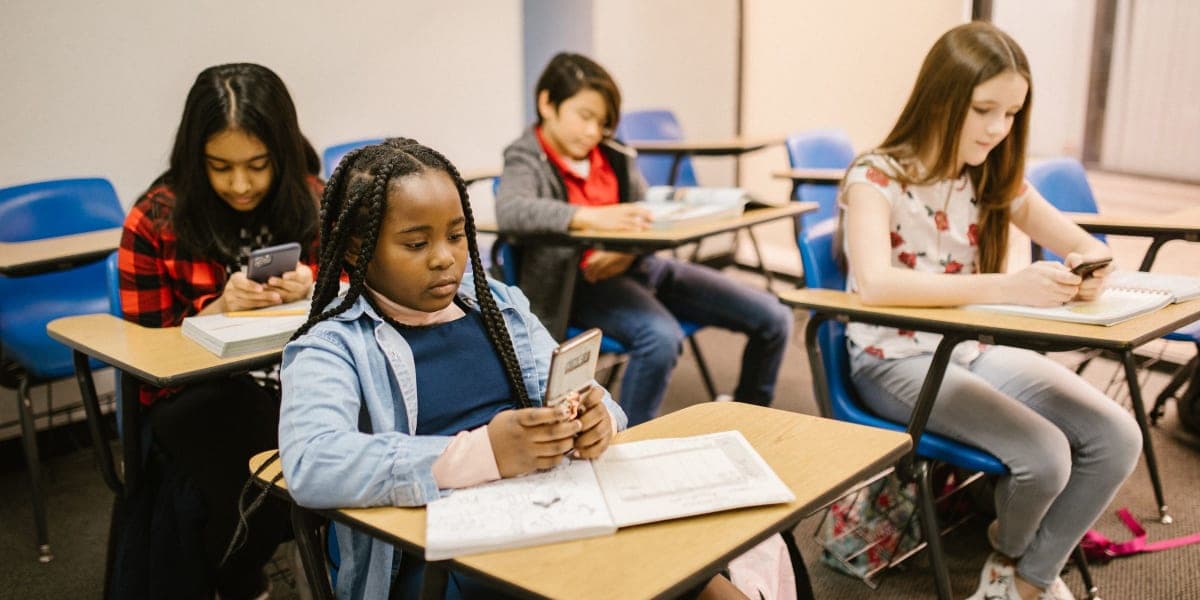
Screens are now one of the first things parents ask about on school tours: phones and smartwatches at break time, and laptops, tablets and homework portals in class.
In Cyprus, the phone rules for public schools are written into regulations. Private schools set their own rules in internal regulations that the Ministry of Education approves and that must follow the public-school rules. Laptops, tablets and portals are each school's own choice.
We checked the regulations and Ministry circulars in force on 20 November 2026. This guide is general information: your child's school's own rules decide what happens there.
Pupils in public primary schools may not bring a mobile phone to school or use one there (Regulatory Administrative Act (KDP) 168/2024). On educational trips, phones, games consoles and touch-screen devices are not allowed unless the trip needs them, but a child with special needs may carry the devices they need.
Under Ministry instructions that public primary schools quote in their letters to parents, smartwatches that can take a SIM card or connect to a phone by Bluetooth are not allowed either. A simple fitness watch with neither function is allowed if parents tell the school in writing.
Phones were already banned in lessons. Since November 2024, pupils may not switch on or use a phone, or any other smart device that can connect to the internet or record images or sound, at any point in the school day, breaks included (Regulatory Administrative Act (KDP) 350/2024). Parliament voted the change on 17 October 2024, and the Ministry circular of 25 October 2024 tells schools how to apply it. Connected smartwatches fall under the same rule.
There are two exceptions: use under a teacher's supervision as part of a lesson, and an emergency involving safety or health. Pupils may still carry a phone if it stays switched off, and the Ministry supports lockers in schools (Minister's statement of 25 September 2024).
If a pupil breaks the rule, the teacher takes the device, it is switched off and kept at the school office, and it is returned to the pupil when that day's lessons end. Schools start with a talk, a warning, a reprimand and a written commitment agreed with the pupil, and keep suspension for repeated offences (Ministry circular of 29 October 2025).
You may read that the rules were extended to smartwatches in 2026. We found no new rule that year: smartwatches were already covered by the rules above.
The amended regulations also ask the Ministry to evaluate, at the end of 2024-25 and of 2025-26, what the ban has changed for behaviour and learning. We found no published evaluation on 20 November 2026 (Regulatory Administrative Act (KDP) 350/2024).
Many parents want their child to have a phone for the bus or the walk home. In a public gymnasium or lyceum that works, as long as the phone stays switched off during the school day. In a public primary school the rule is stricter: the phone may not come to school at all, although some primary schools let parents arrange for it to be handed in at the office on arrival. Ask the head teacher before you buy one.
| School | Phones | Smartwatches | Exceptions |
|---|---|---|---|
| Public primary | Not allowed at school | Watches that call or use Bluetooth not allowed; simple fitness watches with written notice | On trips, devices a child with special needs needs |
| Public gymnasium or lyceum | May be carried switched off; no use all day | Connected watches may not be switched on or used | Supervised use in a lesson; a safety or health emergency |
| Private school | The school's own approved rules | The school's own approved rules | Agreed with the school |
The public-school regulations do not apply to private schools directly. Every private school must have internal regulations approved by the Ministry that match the public-school regulations in structure, content and general approach, covering pupil conduct and discipline among other things. When the public primary or secondary regulations change, private schools must adopt the change within a year (Private Schools Law 147(I)/2019).
In September 2024 the Minister told Parliament that private schools already restricted phones. How they do it varies:
Ask the school for its approved internal regulations or behaviour policy. It should say what happens on a first and a repeat offence, and who keeps the phone.
One national rule does reach private schools: the Ministry's policy and guidelines on the responsible use of artificial intelligence, sent to public and private schools with the circular of 26 November 2025. Ask how the school applies them to homework and coursework.
Neither set of public-school regulations sets out a procedure for a medical or SEN device. Secondary rules allow a phone in a safety or health emergency, and primary rules let a child with special needs carry the devices they need on trips. Anything else is agreed with the school. Common examples:
Agree any device your child needs in writing with the head teacher, the school nurse or the SEN coordinator before term starts, so every teacher is told. Ask how it works on trips, in exams and on the school bus. Our guide to SEN support in private schools covers support plans.
While phones are restricted, many private schools ask families to provide a laptop or tablet for lessons and homework, often from the start of secondary school. This is called BYOD (bring your own device). Schools that do it set their own year group, device and rules.
A typical pattern, with rough cost estimates rather than published figures:
| Stage | Common setup | Costs to plan for |
|---|---|---|
| Early years and lower primary | Shared school tablets or a computer room; little daily screen time | Usually nothing |
| Upper primary | Shared school devices, or a school-managed tablet that some schools ask families to buy | From nothing to about €450 for a tablet |
| Secondary | A laptop or tablet to the school's specification, bought by the family or leased through the school | Roughly €400 to €1,200 or more, plus a case, insurance and sometimes software or management licences |
Some schools require a particular system, such as Windows or Mac for design and coding, or a tablet with a stylus for digital notebooks, and some do not accept Chromebooks. Wait for the school's IT specification before you buy.
The Ministry's device grant is for public-school pupils only. In 2025-26 it paid €100 towards a tablet in Grade 3 and €300 towards a laptop in the second year of gymnasium, for families receiving child benefit (Ministry circular of 10 November 2025). Private-school families should budget for the full cost; our school fees calculator helps you see the year's total.
The grant began in 2024-25 with a one-off €200 towards a tablet and €400 towards a laptop for the same classes (circular of 17 September 2024). In 2025-26 it covered new devices that met the Ministry's minimum specifications. We found no 2026-27 round on 20 November 2026.
If a laptop is broken or stolen at school, the family usually pays. Read the school's device agreement, ask whether lockers are available, and consider accidental-damage insurance if your child carries a laptop every day.
Many private schools run homework, timetables and messages to parents through platforms such as Google Classroom or Microsoft Teams. Schools with IB programmes often use ManageBac or Toddle, and primary classes sometimes use Seesaw.
The upside is that you can see deadlines, attendance and grades as they happen instead of finding missing work at the end of term. The downside is screen time: a few hours on a laptop at school plus digital homework in the evening add up quickly.
We found no official Cyprus limit on screen time for school-age children, so ask how much work is still done on paper, especially in primary school and for handwritten exam practice in secondary.
A private school that teaches at a distance must also have rules on the technology it uses and on pupils' personal data, drawn up after a data protection impact assessment (Law 168(I)/2020). Ask which platforms hold your child's data and who can see it.
Chatbots and other AI tools now sit on the same laptops pupils use for homework. The Ministry's guidelines on artificial intelligence, sent to public and private schools in November 2025, are about using these tools responsibly and ethically (circular of 26 November 2025). Rules on what pupils may use for homework and coursework differ between schools, so ask:
For advice on online safety, the Cyprus Safer Internet Centre runs the CyberSafety helpline 1480 for children, parents and teachers. Our guide to bullying and pastoral care covers what to do about group chats and cyberbullying.
Most phone use happens outside school hours, so the rules at home matter as much as the school's. The Cyprus Safer Internet Centre, CyberSafety, is coordinated by the Cyprus Pedagogical Institute. Its CyberSafety helpline 1480 answers children, parents and teachers by phone, email, online form and chat, Monday to Friday 09:00 to 13:00 and 15:00 to 18:00 and Saturday 10:00 to 13:00, and the same service takes reports of illegal content online. The Pedagogical Institute and CyberSafety also give talks for parents, so ask your school whether one is planned.
If you want a calling or GPS watch for the journey, check the school's rules before you buy it: a public primary school does not allow one at school, and a public secondary school expects it switched off all day. A private school decides under its own approved rules.
Our school visit checklist has more questions for the tour.
Rules change, and each private school applies its own approved regulations, so confirm the details with the school before you buy a device. This guide is general information, not legal advice.
Yes, in public schools. Primary pupils may not bring or use a phone at school. Since November 2024, gymnasium and lyceum pupils may not switch on or use a phone or other connected device at any point in the school day, breaks included, though they may carry one switched off. Private schools set their own rules in Ministry-approved internal regulations, which must follow the public-school rules.
Not in a public primary school if the watch can take a SIM card or connect by Bluetooth: under Ministry instructions it may not be brought to school, even switched off. A simple fitness watch is allowed if you tell the school in writing. A private school decides under its own rules, so ask before you buy one for the journey to school.
In a public gymnasium or lyceum, the teacher takes the phone, it is switched off and kept at the office, and the pupil gets it back when that day's lessons end. Schools start with a talk, a warning and a written commitment, and keep suspension for repeated offences. A private school follows its own approved regulations, which may ask a parent to collect the phone.
In primary school, most use shared school devices. In secondary school, many private schools ask families to buy or lease a laptop or tablet to the school's specification. Wait for the school's IT specification before buying.
No. The grant is for pupils in public schools only. In 2025-26 it paid €100 towards a tablet in Grade 3 and €300 towards a laptop in the second year of gymnasium, for families receiving child benefit.
Usually the family. Check the school's device agreement, ask about lockers, and consider accidental-damage insurance if your child carries a laptop every day.
We found none from the Ministry of Education or the Ministry of Health. The Pedagogical Institute and the Cyprus Safer Internet Centre give advice and talks for parents instead, and the 1480 helpline answers questions about online safety.
Yes. The Ministry sent its policy and guidelines on using artificial intelligence responsibly and ethically to public and private schools in November 2025. Each school decides how pupils may use AI tools for homework and coursework, so ask for its rules.
MEET THE GUIDE AUTHOR
Maria Ioannou researches Cyprus school options so parents can ask sharper questions before they commit.
WELLBEING AND PASTORAL CARE GUIDE
A 2026 guide for parents in Cyprus: what the school-violence law requires of every school, what good pastoral care looks like, counsellors and psychologists, and how to act if your child is bullied.
Read articleVISIT CHECKLIST
A practical, printable checklist to use during private school visits in Cyprus so you can look past marketing and focus on what matters for your child.
Read articleFINANCIAL GUIDE
Maria Ioannou explains how private school fees in Cyprus add up for 2026, from tuition and deposits to uniforms, transport, clubs, and exam entries.
Read articleSCHOOL DAY GUIDE
A 2026-27 guide for parents in Cyprus: public school hours, the optional and unified all-day schools, how to apply, lunch costs, after-school centres and private schools.
Read articleCOMPARING SCHOOLS?
Browse private school profiles by city, curriculum, language, fees and facilities, and shortlist the ones to visit.